stillorigin / how it works
The path of a request.
Visitors connect to the sentry. The sentry filters the traffic. Clean traffic is passed on to the origin.
01
The path of a request
You put a firewall node, called a sentry, in front of your web servers (your origins). Visitors connect to the sentry. The sentry filters the traffic. Clean traffic is passed on to the origin.
Visitor traffic flows only through your servers.
02
The pieces
- Sentry
- A Linux server you provide. It filters traffic for your sites and keeps itself up to date.
- Cluster
- A group of one or more sentries that share settings, domains and a deny list. Every sentry in the cluster handles traffic.
- Origin
- The web server that actually hosts the sites.
- Domain
- A hostname served through a cluster to an origin.
- Portal
- Where you add sentries, origins and domains, set limits, see traffic and blocks, and manage licences.
03
You run the sentries
You run the sentries on your own servers. Visitor traffic flows only through your servers.
You manage everything from the portal at stillorigin.app. The portal is run by stillorigin.
NoteA sentry belongs on its own server or VM. Install it on a fresh server. Do not install one on a machine that already hosts sites.
Sentry software is signed and updates itself.
04
One sentry or several
One sentry is enough. Two or more in a cluster, with DNS pointing at each, gives you resilience.
A cluster is a group of one or more sentries that share settings, domains and a deny list. Every sentry in the cluster handles traffic.
05
Putting a site behind a sentry
- 1Add the origin and the domain in the portal.
- 2Configure the origin to see the real visitor IP.
- 3Point DNS at your sentries.
Point the domain's DNS at the public IPv4 addresses of the sentries in its cluster. IPv4 and IPv6 are supported.
For HTTPS, the sentry can pass the real visitor IP to the origin using PROXY protocol. Setup guides cover cPanel, Plesk, Enhance and DirectAdmin.
06
Seeing what happened
The portal shows traffic, blocked IPs, and why they were blocked.
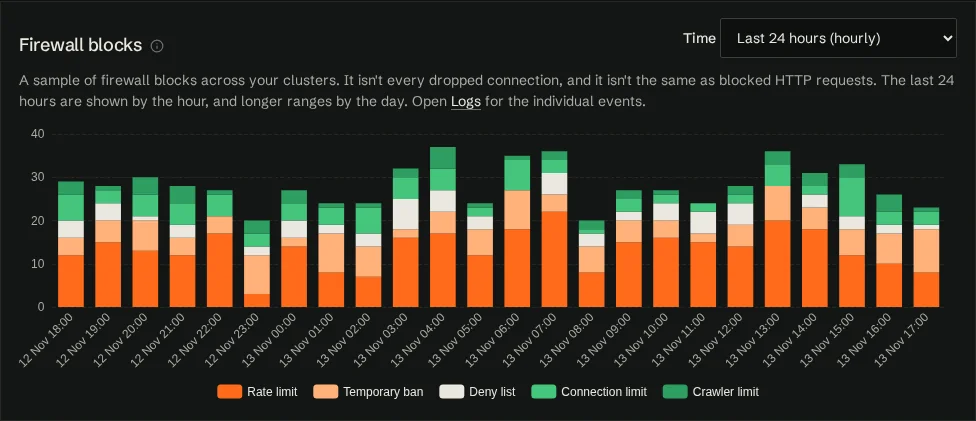
Firewall blocks are broken down by reason, so you can see whether traffic was stopped by a rate limit, a temporary ban, your deny list, a connection limit, a crawler limit or an origin limit. Traffic insights →
Next: read the requirements and steps, or go straight to the setup guide in the docs.
Start a free trial, or read the docs.
Support and all customer communication go through the helpdesk ticket system in the portal. Pre-sales and media enquiries can use the contact form.