Every domain gets Network protection. It works on connections, so the sentry does not need to read or decrypt the request.
Per-IP limits on new connections per second, and on open connections, on ports 80 and 443
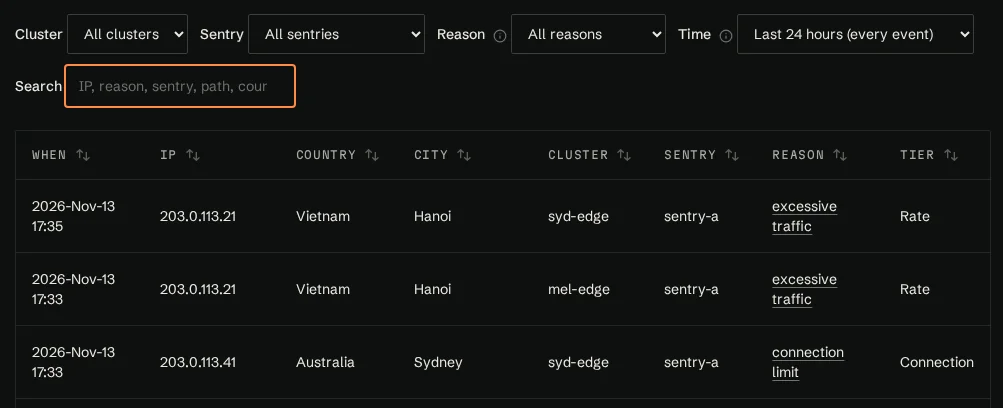
Temporary bans for addresses that keep going over their limits, with the time left, and the option to unban an address or make the ban permanent
Your own deny list. A change reaches the cluster's sentries within a minute
Connections for hostnames you haven't added are refused
With Website protection off, HTTPS is passed through by hostname without being decrypted, and the sentry does not need your SSL certificate
Each cluster has its own deny list. Addresses from the stillorigin naughty list feed the deny list.
PortalDeny listAlways on
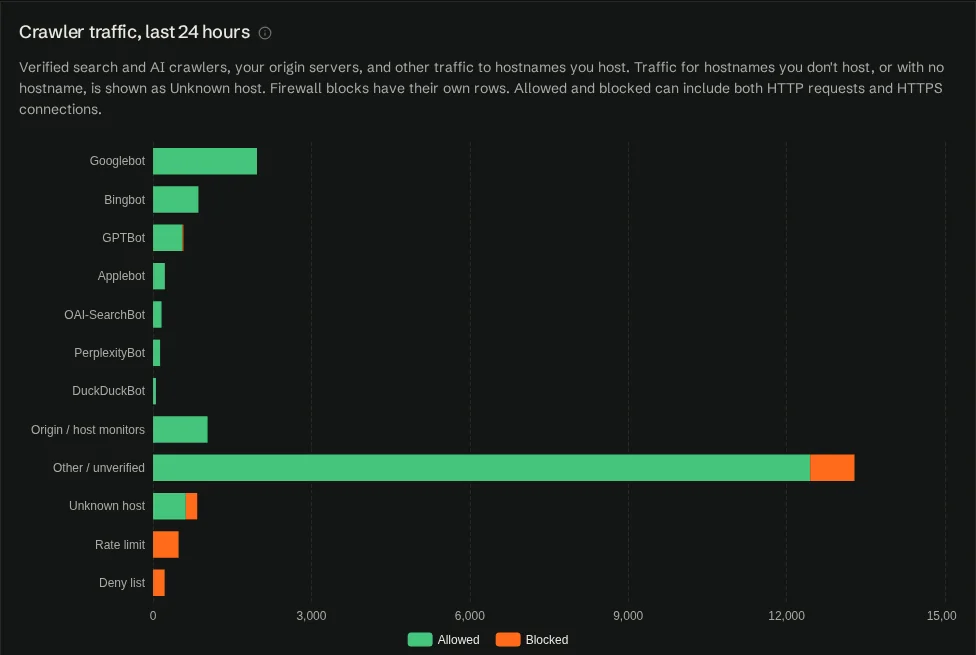
Verified search and AI crawlers
Verified search and AI crawlers, such as Googlebot, Bingbot, GPTBot, Applebot, PerplexityBot, Claude and Amazonbot, are recognised by their published IP ranges, not by user-agent strings. The list grows as providers publish official IP lists.
They get their own limits, lower than ordinary visitors' by default, which you can raise if a legitimate crawler is being held back. You can block fake crawlers, and choose, per provider, what to do with each AI crawler.
The portal's Identified traffic section shows allowed and blocked traffic grouped by type, so a scraper using a crawler's name shows up as unverified. Monitoring, site management, security platforms and internet scanners are named for reporting only. Identified traffic →
PortalIdentified traffic, last 24 hoursShared
Naughty list
The stillorigin naughty list is a list of addresses that have sent abusive traffic, such as vulnerability scans, password guessing and floods of requests. stillorigin's team adds addresses, and an address is also added automatically when sentries at three or more separate stillorigin customers block it for excessive traffic within 24 hours. Addresses from the list feed each cluster's deny list.
Visitors who need a check see a stillorigin-branded page that checks their browser automatically. People get through in a few seconds, with no puzzle to solve and nothing to click. A pass lasts 30 minutes. Captcha Protection is self-hosted, with no third-party captcha service. The portal shows how many checks were shown, passed and failed, on the dashboard and per domain.
Origin
Origin load protection
Origin agents report load, and sentries notice slow origins themselves. In the portal you can see when an origin was under load.
Under load mode steps up: first it slows bots, then it tightens limits, and finally it shows visitors a busy page that tells browsers when to retry. Search engines are only held back in the worst case. A manual Under Attack! switch and optional email alerts are available.
Opt-in
Website protection (L7)
Website protection is opt-in, per domain, and uses a Website protection licence. Each sentry includes one. It applies to HTTP and HTTPS sites. With Website protection on, the sentry runs ModSecurity with the OWASP Core Rule Set. New domains start in log mode, which shows what would be blocked.
You can set per-domain path rate limits, bot controls, geo allow or deny lists, and per-domain IP lists. Signed rule updates can be applied as released, after 7 days (the default), after 30 days, or when you choose.
With Website protection off, HTTPS stays passed through and is not decrypted. With Website protection on, the origin agent hands the site's existing certificate to the sentries, sealed so only sentries can read it.
Opt-in
App hardening packs
App hardening packs are available for WordPress, Drupal, Joomla and Laravel, with more to follow.
The WordPress pack blocks xmlrpc, scripts in uploads, PHP in wp-includes, installer and config files, and user enumeration. It can also lock wp-login and wp-admin to the IP addresses you choose.
Origin
Origin agent
Network protection needs nothing installed on the origin server. An optional origin agent — for Linux on cPanel/WHM, DirectAdmin, Plesk or a generic server, and for Enhance via its API — adds HTTPS inspection and failed-login reporting. A free cPanel plugin uses it to add a Manage protection page to cPanel, with more panels to follow.
Origin
Real visitor IP for HTTPS
For HTTPS, the sentry can pass the real visitor IP to the origin using PROXY protocol. Setup guides cover cPanel, Plesk, Enhance and DirectAdmin.
Network
IPv4 and IPv6
IPv4 and IPv6 are supported.
Hosts
In front of your panel servers
stillorigin sits in front of the web server. It works in front of servers running cPanel, Plesk, Enhance or DirectAdmin. You add sentries, origins and domains in the portal, within your licences.
Billing
Billing integration
A free WHMCS module sells Website protection as a product, with a Manage protection button. More billing systems are to follow, including Blesta, Upmind, HostBill and ClientExec.
Owners
For domain owners
Domain owners don't need a stillorigin account. The host gives a one-time login link for one domain. The area is stillorigin-branded, and the host decides what owners can change.
Portal
The portal
In the portal at stillorigin.app you add sentries, origins and domains, set limits, see traffic, blocked IPs and the reasons, and manage licences. Traffic insights →